Wednesday, January 8, 2014

Sprint Unveils Group 'Framily' Plan for Friends and Family


LG G Flex 

Sprint today revealed a new plan that extends the concept of family plans to non-relatives.
With the Sprint Framily Plan, customers can decide who they consider family, the carrier said at CES. New and existing customers can add up to 10 phone lines to one account, with each person getting a separate bill.
The more people who join a Framily Plan, the higher the savings. One line is $55 per month for unlimited talk, text, and 1GB of data. That goes down by $5 per month for each person who joins, for a maximum monthly discount of $30 per line. With a group of at least seven people, everyone gets unlimited talk, text, and 1GB of data for $25 per month per line.
For $20 per month per line, Framily members can buy up to unlimited data and get a new phone every year. The Framily plan will be available starting Jan. 10 online and in stores.
CES 2014 Bug There doesn't appear to be any restrictions on who you can add to your "framily"; Sprint's announcement mentions your yoga teacher, barista, fantasy football team, and parents on your son's soccer team. "A group of family, friends and others you can now call 'framily,'" Sprint said.
Really, it's a move to get new customers. Current customers can move to a Framily plan and then invite people to join their account. But existing Sprint accounts cannot be combined into one Framily plan unless both accounts are owned by the same person.
Exiting customers who are on a plan with a discounted phone, meanwhile, will have to pay an extra $15 per month per line until their line is upgrade eligible. But for a limited time, Sprint will waive the $15 per month to move to the Sprint Framily Plan for customers who purchased a discounted phone before Jan. 10 and are not upgrade eligible.
To accommodate these and other customers, Sprint is now rolling out its Sprint Spark LTE upgrade plan in Dallas, Austin, Fort Worth, Houston, San Antonio, as well as Fort Lauderdale, Fla.  

n October, Sprint unveiled an ambitious plan to more than double the wireless broadband speed on its 4G-LTE Sprint Spark network in the United States by the end of 2014, while also increasing coverage and capacity significantly. The Sprint Spark network is now up and running in 11 markets, including Chicago, Los Angeles, Miami, New York, and Tampa.
Sprint started selling the first tri-band-capable smartphones for its Sprint Spark network on Nov. 8: the LG G2, Samsung Galaxy Mega, and Samsung Galaxy S4 Mini. The HTC One Max and Netgear Zing Mobile Hotspot were added later.
This week, Sprint added a few more devices to its Spark lineup: the curved LG G Flex (pictured), the Nexus 5 $478.00 at Amazon, and the Netgear LTE Gateway 6100D.


Android Coupons App Leaks Your Personal Information To Everyon


Image via Flickr user Tiago A. Pereira
We've looked at several apps for Android that gather, to paraphrase John Hodgman, more information than they require. We've also looked at several apps that handle that information badly, allowing it to be easily extracted or intercepted. This week, Appthority shows us an app that does both, and also transmits your information to any other server it contacts.
The Coupons App
Appthority tipped us to an app called The Coupons App currently on Google Play, which includes a suite of tools to connect you with deals on everything from restaurants to gas. But in their analysis, Appthority found that The Coupons App "continuously sends private information over the network without protecting it with encryption." This includes your device ID or IMEI number, your phone number, your email address, your zip code, and the exact geolocation of your device.
Many apps collect this kind of information—some for their own analysis and some for selling to third party ad networks. Unfortunately, Android does not give you the ability to control what information apps can access. There's only a single all-or-nothing permissions warning when you first download an app. Not encrypting the information compounds the issue, since someone snooping on the network could nab it during a man-in-the-middle attack.
Unfortunately, this is not the last of The Coupons App's sins. "The private data is sent to the server used by the app, but it also leaks the private information in the "Referer" field," said Appthority, referring to a misspelled HTML header field that identifies the address of the webpage you're currently on to the webpage you're heading toward.
Let's say you're searching for "pharmacy" and The Coupons App uses a book cover image from Amazon in the search results. When the app communicates with Amazon to get that image, it included a lot of your personal information in the exchange.  Here's Appthority's example, bolded for emphasis. Note that the email address and phone number are clearly visible.
Appthority
Click for a larger image 
Appthority added, "if the app was properly encrypting the link to their servers with the private data (ssl), the referer would not be set or sent to external web sites." Appthority notes that The Coupons App is possibly leaking this information to other servers unknowingly.
How Can You Stay Safe?
The Coupons App underlines one of the biggest problems with mobile security: That the end user (you) doesn't always know what potentially dangerous activities an app might be carrying out. Even if you read the permissions requested by The Coupons App, you wouldn't know why it was harvesting information or that your data was being leaked to other servers.
Furthermore, the limitations of Android don't allow you to control what apps can access certain information—like your current location. In the case of The Coupons App, this means that simply using it, and others with similar issues, puts your information at risk.
For the time being, it seems like The Coupons App should be avoided until the developers fix these security issues. 

The Simpsons: Tapped Out (for iPhone)

Rebuilding Springfield
When you first download the game, you're treated to a fully animated cut scene where Homer Simpson, the franchise's layabout anti-hero, complains about a game on his tablet. "All you do is tap and wait and tap and wait," he says, foreshadowing much of what you'll be doing once Springfield is destroyed in a nuclear explosion seconds later.
With the town leveled, you take control of Homer and other characters to rebuild Springfield. You place buildings wherever you like, though they can only face one of two directions. Sprinkle the landscape with trees, rivers, roads, and statues of founding heroes for the complete experience. Of course, constructing all this takes time and money. Time you already have, but money is earned by completing quests and assigning jobs to characters, which take anywhere between a few seconds and several days. Most of these tasks are fun to watch, like Comic Book Guy cosplaying as Spock or Mr. Burns being dragged by his hounds, while others aren't animated and take place off-screen.
The Simpsons: Tapped Out
The game quickly falls into a familiar rhythm of assigning tasks, waiting, collecting the money your characters earned, and then spending it on something for the town. It's not deep gameplay, but Tapped Out strings you along with witty textual interactions between characters, familiar faces and features (I scrimped and saved to build all three sections of the Nuclear Power Plant), and tons of locked content.
If you don't have time but you have real, actual money, you can invest in Tapped Out's premium currency: donuts (mmm…donuts). Donuts can be used to hurry any task, or purchase special content. Don't bother trying to unlock Hank Scorpio's impressive volcano lair; only donuts will do.
Other Springfields
In addition to tapping and waiting in your Springfield, you can visit other Springfields as well. I'll skip the game's sci-fi explanation for this, but it's how the game handles multiplayer. No friends? No worries! The game maintains an alternate Springfield for you lonely losers to visit.
In other players' Springfields, you can perform any three actions in a 24-hour period. This usually means completing a task, like collecting a building's income tax, or defacing a building with spray paint. Massive in-game events add more options, which is adds a little meat to this unfortunately thin feature.

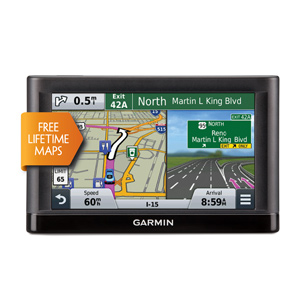
nüvi® 55LM

nüvi® 55LM

Essential Series Navigation for Your Car

  • Easy-to-use dedicated GPS navigator with 5.0” dual-orientation display
  • Does not rely on cellular signals; unaffected by cellular dead zones
  • Preloaded with detailed maps of the lower 49 states, plus free lifetime updates¹
  • Navigate complex interchanges with ease
  • Easily search addresses and millions of points of interest
No Cell Phone Signal

Dedicated, Easy-to-use GPS Guidance

For driving directions on the road, put away the smartphone and power on your nüvi. nüvi 55LM is an easy-to-use, dedicated GPS navigator that does not rely on cellular signals and is unaffected by cellular dead zones. nüvi provides easy-to-follow, spoken turn-by-turn directions with street names.
nüvi 55LM features a bright, 5.0” dual-orientation display, for use horizontally or vertically.

Detailed Maps

nüvi 55LM arrives pre-loaded with detailed maps of the lower 49 states.

Free Lifetime Map Updates

Roads change. Businesses open and close. nüvi 55LM enables you to keep your device up-to-date with the latest maps¹ that Garmin has to offer, with no fees. Map updates also contain fresher points of interest, so your nüvi can give results that are more relevant and have greater accuracy. With increased road detail and more points of interest, new maps could be larger in size; as a result, map updates may require a microSD™ card (sold separately).

Navigate Complex Interchanges with Ease

nüvi 55LM has lane assist with junction view that displays upcoming junctions and uses brightly colored arrows to indicate your proper lane.

Easier to Search, Quicker to Find

nüvi 55LM has a search field that makes it easy to find addresses and millions of points of interest, in a single place. Now, simply enter a category (like “pizza”), an entire address (“1234 Sycamore Lane, Anytown, USA”) or a proper name (“Starbucks”) and nüvi 55LM quickly returns your results.

More Information Right on Your Map

No need to search for a hard-to-read or nonexistent sign; with a glance at nüvi 55LM, you’ll see your current street. nüvi also displays speed limit, current speed and estimated arrival time.
With the Up Ahead feature, you can easily find places you want – like restaurants, gas stations, ATMs and shops – without leaving the map. Best of all, Up Ahead is customizable, so you can always know the location of favorite destinations along your route.
You can access Up Ahead and other useful information from the map tools panel. Conveniently remain on your map screen and still find places Up Ahead, change the volume and more.

School Zone Warnings

nüvi 55LM issues an audible alert and displays an onscreen warning whenever you approach a school zone.

One-stop Device Management

Use Garmin Express to keep your nüvi up-to-date. Garmin Express makes it easy to update maps and software, transfer favorites to and from devices, and install free custom vehicles and voices.

Physical & Performance

Unit dimensions, WxHxD 5.5"W x 3.4"H x 0.8"D (13.9 x 8.6 x 2.0 cm)
Display size, WxH 4.4"W x 2.5"H (11.1 x 6.3 cm); 5.0" diag (12.7 cm)
Display resolution, WxH 480 x 272 pixels
Display type WQVGA color TFT with white backlight
Weight 6.4 oz (180.1 g)
Battery rechargeable lithium-ion
Battery life up to 2 hours
Headphone jack/audio line-out No
High-sensitivity receiver Yes
Waterproof No

Maps & Memory

Preloaded street maps Yes
Includes lifetime map updates Yes
nüMaps Guarantee yes
3-D terrain view No
3-D buildings and landmarks view No
Built-in memory internal solid state
Accepts data cards microSD™ card (not included)
Waypoints/favorites/locations 1000

Features & Benefits

Features That Save Time & Money
Voice prompts (e.g. "Turn right in 500 ft.") Yes (Internal speaker)
Speaks street names (e.g. "Turn right ON ELM STREET in 500 ft.") Yes
Voice-activated navigation (operate device with spoken commands) No
Traffic compatible (routes around traffic with a receiver and subscription) No
Lifetime traffic updates (receive free lifetime traffic updates) No
Lane assist (guides to proper lane for navigation) Yes
Junction view (displays junction signs) Yes
myTrends™ (predicts your routes) Yes
trafficTrends™ (calculates routes based on predicted traffic flow) No
Auto sort multiple destinations (provides most direct route) Yes
Route avoidance (avoid highways, tolls etc.) Yes
XM® compatible for U.S No
Safe Navigation Features
Bluetooth® wireless technology No
Speed limit indicator (displays speed limit for most major roads in the U.S. and Europe) Yes
Where Am I? (find closest hospitals, police & gas stations, nearest address & intersection) Yes
Enhanced pedestrian navigation (guides you as you walk around town) no
Photo navigation (navigate to geotagged photos) No
View upcoming points of interest along route Yes
Custom POIs (ability to add additional points of interest) Yes
Garmin Lock™ (anti-theft feature) No
Customizable Features
Garmin Garage™ vehicles compatible (download car-shaped icons to your device) Yes
Garmin Garage™ voices compatible (download custom voices to your device) Yes
MP3 player No
Audio book player No

Additional Specs

Trip Planner: yes
Trip Log: yes
This USB mass storage device is compatible with Windows® XP or newer and Mac® OS X 10.4 or later.

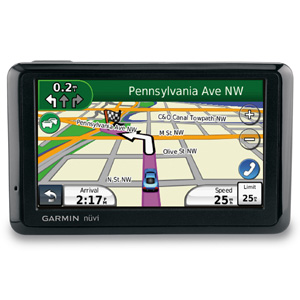
nüvi® 1390T

 nüvi® 1390T
The nüvi 1390T includes FREE lifetime traffic. This thin navigator also comes with lane assist with junction view, pedestrian navigation options, hands-free calling and ecoRoute™.

Includes Lifetime Traffic

A combination power cable/traffic receiver in the box gives you traffic services for the life¹ of your device. You’ll avoid traffic jams and keep moving when your nüvi alerts you and offers detours. No additional purchases are necessary — it’s 100% subscription-free traffic.

Know the Lane Before It’s Too Late

No more guessing which lane you need to be in to make an upcoming turn. Lane assist with junction view guides you to the correct lane for an approaching turn or exit, making unfamiliar intersections and exits easy to navigate. It realistically displays road signs and junctions on your route along with arrows that indicate the proper lane for navigation. Lane assist with junction view is available in select metropolitan cities.

Turn-by-turn Directions

nüvi 1390T has an intuitive interface that greets you with 2 simple questions: “Where To?” and “View Map.” Touch the color screen to easily look up addresses and services and get voice-prompted, turn-by-turn directions that speak street names to your destination. It comes preloaded with detailed City Navigator® NT street maps, nearly 6 million points of interest (POIs), 2-D or 3-D maps and the speed limit for most major roads. And with HotFix® satellite prediction, nüvi calculates your position faster to get you there quicker.

Go Beyond Navigation

Also offered on nüvi 1390T are standard nüvi features that go beyond navigation:
  • enhanced pedestrian navigation capabilities
  • ecoRoute™ — a green feature that calculates a more fuel-efficient route and tracks fuel usage
  • travel tools — JPEG picture viewer, world travel clock with time zones, currency converter, measurement converter and calculator
  • “Where Am I?” emergency locator — get your exact latitude and longitude coordinates, the nearest address and intersection, and the closest hospitals, police stations, and fuel stations
  • anti-theft feature Garmin Lock™
  • custom voices and vehicles from Garmin Garage™
  • microSD™ card slot
  • hands-free calling capability using Bluetooth® wireless technology
  •  

    Physical & Performance

    Unit dimensions, WxHxD 4.8"W x 2.9"H x .6"D (12.1 x 7.6 x 1.5 cm)
    Display size, WxH 3.81"W x 2.25"H (9.7 x 5.7 cm); 4.3" diag (10.9 cm)
    Display resolution, WxH 480 x 272 pixels
    Display type WQVGA color TFT with white backlight
    Weight 5.7 ounces (161.6 g)
    Battery rechargeable lithium-ion
    Battery life up to 4 hours
    Headphone jack/audio line-out No
    High-sensitivity receiver Yes
    Waterproof No

    Maps & Memory

    Preloaded street maps Yes
    Includes lifetime map updates No
    nüMaps Guarantee yes
    3-D terrain view No
    3-D buildings and landmarks view No
    Built-in memory internal solid state
    Accepts data cards microSD™ card (not included)
    Waypoints/favorites/locations 1000

    Features & Benefits

    Features That Save Time & Money
    Voice prompts (e.g. "Turn right in 500 ft.") Yes (Internal speaker)
    Speaks street names (e.g. "Turn right ON ELM STREET in 500 ft.") Yes
    Voice-activated navigation (operate device with spoken commands) No
    Traffic compatible (routes around traffic with a receiver and subscription) Yes (receiver and lifetime traffic included)
    Lifetime traffic updates (receive free lifetime traffic updates) Yes
    Lane assist (guides to proper lane for navigation) Yes
    Junction view (displays junction signs) Yes
    myTrends™ (predicts your routes) No
    trafficTrends™ (calculates routes based on predicted traffic flow) No
    Auto sort multiple destinations (provides most direct route) No
    Route avoidance (avoid highways, tolls etc.) Yes
    XM® compatible for U.S No
    Safe Navigation Features
    Bluetooth® wireless technology Yes
    Speed limit indicator (displays speed limit for most major roads in the U.S. and Europe) Yes
    Where Am I? (find closest hospitals, police & gas stations, nearest address & intersection) Yes
    Enhanced pedestrian navigation (guides you as you walk around town) yes
    Photo navigation (navigate to geotagged photos) Yes
    View upcoming points of interest along route No
    Custom POIs (ability to add additional points of interest) Yes
    Garmin Lock™ (anti-theft feature) Yes
    Customizable Features
    Garmin Garage™ vehicles compatible (download car-shaped icons to your device) Yes
    Garmin Garage™ voices compatible (download custom voices to your device) Yes
    MP3 player No
    Audio book player No

    Additional Specs

    This USB mass storage device is compatible with Windows® XP or newer and Mac® OS X 10.4 or late

iRing adds gesture-control capability to iOS music apps (video)


This year's CES has introduced us to a number of devices that cater to specific people. That includes IK Multimedia's iRing accessory, designed for aspiring DJs who'd like to control their iOS music apps with gestures... and a dash of showmanship. So long as a user's wearing the iRing, the iDevice's front camera picks the gesture controls up, and the peripheral's accompanying app translates them to commands music software can understand. According to the company (the same one responsible for a few other music accessories for iOS), the iRing's capable of controlling not only basic music apps, but also advanced ones designed for those who mix their own tunes. It also comes with a couple of its own music-editing apps that one can use to add effects and create non-stop loops. Those who prefer waving their hands in the air over poking at on-screen controls can get the iRing in various music and electronic retailers worldwide for $25.

Leak reportedly shows Nokia Normandy's Android interface

We've heard a number of rumors recently about Nokia's Normandy phone, which will supposedly ship with an Android-based operating system. Shots of the handset, with its lack of a hardware shutter trigger, capacitive buttons and LED flash, appeared back in December, and now mobile tipster @Evleaks has posted what could be the first shots of Nokia's alternative take on Google's open-source platform. Three leaked renders of the device show support for dual SIMs, lockscreen notifications, a dialer screen and what appears to be a custom version of Skype's mobile app.
Nokia's Normandy project is said to be a low-end Asha equivalent that runs a forked version of Android, meaning it won't be associated with Google's apps and services (similar to Amazon's Kindle Fire tablets). As we know, Nokia's mobile business is currently awaiting the all-clear for an acquisition by Microsoft, meaning the project might never see the light of day. The leaked shots suggest Nokia has made significant progress with Normandy, but we'll have to wait and see if the project forms part of its new owner's future plans.